

WordPress Server-Side Tracking: Complete Guide to sGTM, WooCommerce & GA4
WordPress server-side tracking helps recover missing conversion data, improve tracking accuracy, and strengthen GA4, Google Ads, Meta, and WooCommerce reporting. Learn how it works, which setup is right for your site, and how to avoid common tracking issues. Need help fixing data gaps? Tagassists can audit and implement your server-side tracking setup. Get a free tracking audit today.
Last Update: August 20, 2026
You set up GA4, you installed the Meta Pixel and connected Google Ads. Everything looks active in your dashboard. But your WooCommerce orders and your Google Ads conversions don’t match.
Client-side tracking loses 30 to 45 percent of your data in 2026 due to ad blockers, Safari ITP, and browser restrictions. WordPress server-side tracking routes events through your own server first, recovering most of that lost data and giving GA4, Google Ads, Meta, and other platforms more complete conversion signals to optimise against.
In 2026, client-side tracking alone leaves a serious gap. Safari’s Intelligent Tracking Prevention caps JavaScript-set cookies at seven days. Ad blockers affect 31.5 percent of global internet users, with rates above 40 percent in Germany, France, and tech-savvy audiences. Every iOS browser ITP affects roughly 27 percent of all mobile traffic regardless of which browser icon the user tapped.
With WordPress server-side tracking, your data doesn’t go through a browser that can block it. It goes through your own infrastructure. At Tagassists, we implement server-side tracking for WordPress and WooCommerce sites regularly. The improvement in data completeness and advertising accuracy after a properly configured setup is consistent and measurable.
Today we will show you what WordPress server-side tracking is, how it works, who needs it, how to implement it, how to validate it, and what the most common mistakes look like.
Key Points:
- Client-side tracking loses 30 to 45 percent of data in 2026 due to ad blockers and browser privacy features.
- Server-side tracking routes events through your own server before forwarding to analytics and ad platforms.
- WooCommerce stores benefit the most because purchase events are the most valuable and the most commonly lost.
- Three main implementation paths exist for WordPress: Cloudflare Zaraz, server-side GTM, and direct API integrations like Meta CAPI and GA4 Measurement Protocol.
- Deduplication is not optional. Without it you will double-count conversions across browser and server events.
- Consent Mode still applies server-side. Moving tracking to the server does not bypass privacy law.
What Is WordPress Server-Side Tracking?
WordPress server-side tracking is a setup where website events are processed on a server you control before being forwarded to analytics and advertising platforms. The visitor’s browser still initiates the event, but instead of that event going directly to google-analytics.com or pixel.facebook.com where it can be blocked, it goes to your own server first. Your server then decides what to send, where to send it, and what to filter out.
Client-Side vs Server-Side: What Actually Changes
In a standard client-side setup, every analytics vendor you use loads its own JavaScript library directly in the visitor’s browser. Each library makes its own outbound request to its own domain. Ad blockers intercept and drop these requests. Safari ITP limits how long cookies set by those scripts can last. The browser does all the work, and the browser is increasingly hostile to tracking scripts.
With server-side tracking, the browser sends a single event to your own server endpoint, something like metrics.yourdomain.com. Your server receives that event, processes it, and distributes it to GA4, Google Ads, Meta, TikTok, and any other destination. The browser does less work. The ad blockers see only a request to your own domain, not to a known tracking endpoint. Safari’s cookie restrictions don’t apply to cookies set by your server.
Feature | Client-Side Tracking | Server-Side Tracking |
Ad blocker impact | High. Requests to known vendor domains are blocked. | Low. Requests go to your own domain, not a blocklist target. |
Cookie lifespan in Safari | 7 days maximum due to ITP. | Up to 1 year. Server-set cookies are not subject to ITP in the same way. |
Page load impact | High. Each vendor script adds HTTP requests and JavaScript execution. | Low. One lightweight client sends data to your server. |
Data filtering | None. Vendor script sends everything it can access. | Full. You control every field before it reaches any vendor. |
Privacy compliance | Harder. Vendor code runs in browser with broad access. | Easier. Every outbound request passes through your controlled server. |
Setup complexity | Low. Paste script tags in header. | Medium to high. Requires server configuration and deduplication logic. |
Data accuracy | 60 to 70 percent of actual events in blocked audiences. | 90 to 97 percent recovery with correct configuration. |
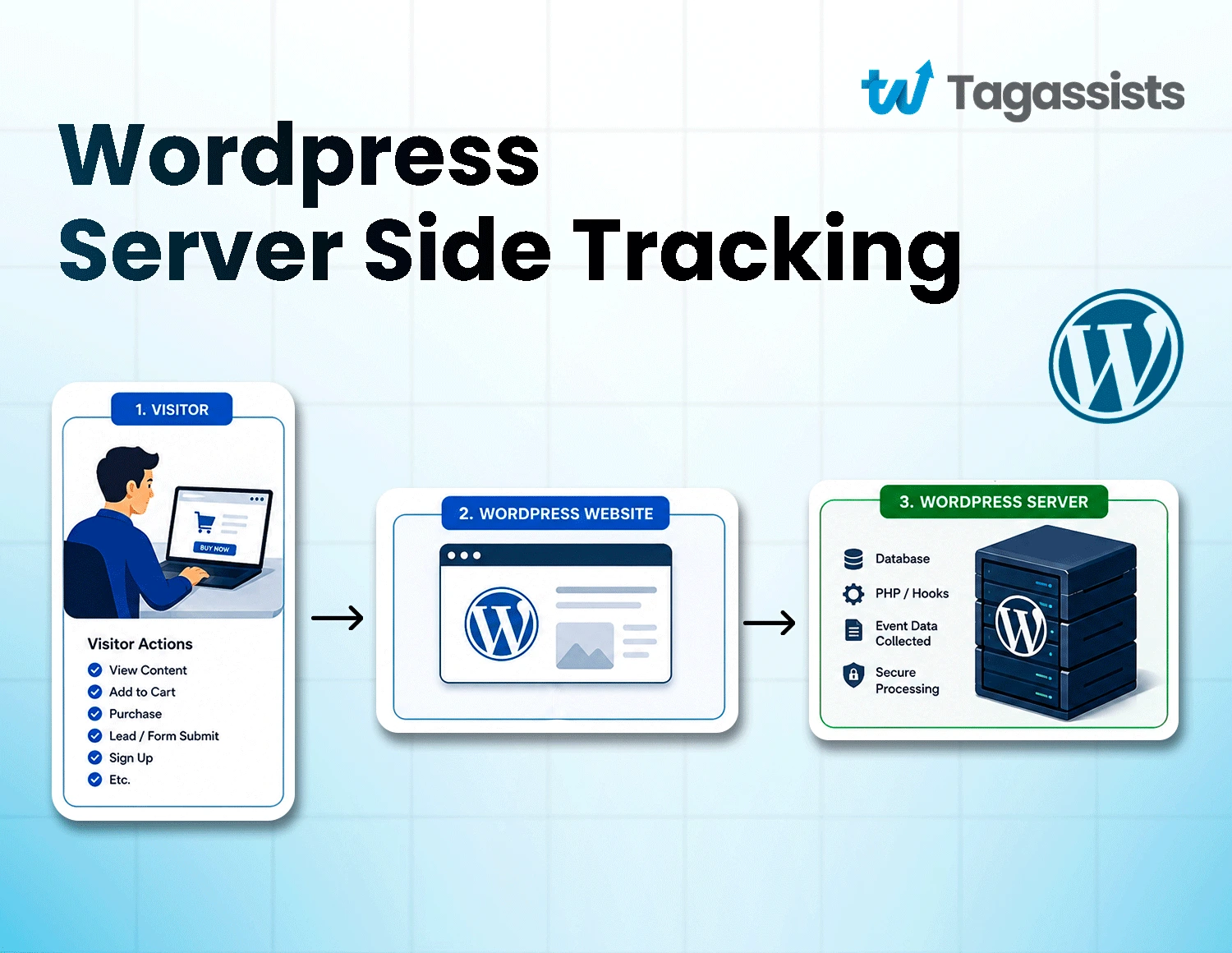
How WordPress Server-Side Tracking Works: The Data Flow
The architecture follows a consistent pattern regardless of which implementation method you choose:
- Visitor action: A user views a product, adds to cart, or completes a purchase on your WordPress or WooCommerce site.
- Browser event: The browser fires an event. For standard GTM-based setups, this goes to your web GTM container. For server-hook setups, WordPress itself triggers the event via a PHP hook.
- Server endpoint: The event reaches your server at a subdomain like metrics.yourdomain.com. This is your sGTM container, your Cloudflare Zaraz edge, or your direct API integration.
- Processing: Your server validates the event, checks consent state, removes or hashes any PII, deduplicates against browser events already sent, and formats the data for each destination.
- Distribution: Your server forwards the processed event to GA4, Google Ads, Meta CAPI, TikTok Events API, and any other platform in your stack simultaneously.
Server-side tracking is not browser-free tracking. For most WordPress setups, the browser still initiates the event. What changes is the routing path: instead of the browser talking directly to Google or Meta, it talks to your server, which then talks to Google and Meta. The benefit is that your server is not on any blocklist.
Why WordPress Sites Need Server-Side Tracking
WordPress runs 43 percent of the internet, which means it also runs a disproportionate share of the client-side tracking that is currently losing data at scale. By setting up WordPress server-side tracking, you get better accuracy in data, better GDPR compliance, improved website performance by getting all the data, and future-proof analytics.
Here’s the importance of server-side tracking for WordPress sites.
Better Data Accuracy
31.5 percent of global internet users run ad blockers. In tech-heavy audiences, that number reaches 40 to 50 percent. In Germany, over 49 percent of users run ad blockers. These blockers intercept client-side requests to known analytics domains and drop them before they reach GA4 or any other platform. The conversion happened. The event never arrived.
Server-side tracking routes those events through your own subdomain. Ad blockers don’t know to block metrics.yourdomain.com. The data gets through. A correctly configured server-side setup with a custom first-party domain and custom loader recovers 20 to 40 percent more events compared to client-side tracking alone.
Improved Website Performance
Every third-party tracking script you load client-side adds to your page weight. A typical WordPress site with GA4, Google Ads remarketing, Meta Pixel, TikTok, and LinkedIn might load five or more separate JavaScript libraries on every page. Each one is an HTTP request, a script download, and CPU time executing in the visitor’s browser.
Server-side tracking replaces those individual vendor scripts with a single lightweight event sender. The heavy processing happens on your server. The browser does less, pages load faster, and your Core Web Vitals scores improve. This matters both for user experience and for Google’s ranking signals.
Better Privacy and GDPR Compliance
GDPR requires you to control what personal data you collect and where it goes. In a client-side setup, you’re trusting vendor JavaScript to behave within the boundaries of your privacy policy. You have limited technical control over what a third-party library actually sends.
With server-side tracking, every outbound request passes through your server. You can strip IP addresses before forwarding events to analytics platforms, hash email addresses for Enhanced Conversions matching, filter out fields your internal data layer contains but vendors don’t need to see, and enforce consent signals at the server level before any data is transmitted. That’s real technical compliance, not just policy compliance.
Longer Attribution Windows
Safari’s ITP caps JavaScript-set first-party cookies at seven days. Sometimes 24 hours. For any business with a consideration cycle longer than a week, that means returning visitors are regularly treated as new users with no attribution. Your returning customer who first clicked a Google Ad nine days ago generates a direct session in your reports, not a paid search conversion.
Server-set cookies can persist for up to one year. This means visitors who research for weeks before buying still get attributed correctly to the campaigns that drove their initial visit. Your remarketing audiences stay populated. Your Smart Bidding data reflects a more complete picture of your customer journey.
More Reliable Marketing Attribution
When your conversion data is missing 30 to 45 percent of actual events, your attribution models are wrong. The channels and campaigns that look like they’re driving results may be doing so partly because their conversions are more likely to be captured, not because they’re genuinely performing better. Server-side tracking gives attribution models more complete data to work with, producing more accurate channel comparisons and better budget allocation decisions.
Future-Proof Analytics
Browser privacy restrictions are moving in one direction. Safari tightens ITP regularly. Firefox Enhanced Tracking Protection is on by default. Brave has 100 million monthly active users and blocks most analytics scripts by default. Third-party cookies are gone in Safari and Firefox already. The client-side tracking environment gets more restrictive every year.
Server-side tracking routes data through your own infrastructure, which is not affected by browser-level tracking restrictions. Whatever browsers add to their blocklists next year, your server-side setup isn’t on it. That’s a more stable foundation for analytics than client-side scripts competing with browser privacy features.
Who Should Use WordPress Server-Side Tracking?
Anyone who wants accurate data, no duplication and don’t want any interaction miss from the customers or visitors needs WordPress server-side tracking. For example who have business in WooCommerce, Saas companies, blog sites with no marketing, or affiliate markets needs server-side tracking.
Here’s who benefits most and who can reasonably wait.
Site Type | Why Server-Side Tracking Matters | Priority |
WooCommerce stores | Purchase events are highest-value and most affected by browser restrictions. Missing purchase conversions directly breaks Smart Bidding and ROAS reporting. | High |
Lead generation sites | Form submissions routed through server can be matched to CRM records. Offline conversion upload gives Google Ads qualified leads, not just form fills. | High |
Membership sites | Recurring subscription events benefit from extended cookie lifespan for long-cycle attribution. Login-based User IDs provide stable identification. | Medium-High |
SaaS WordPress sites | Trial signups, feature activations, and upgrade events benefit from more complete tracking across the full funnel. | Medium-High |
Affiliate marketers | First-party cookie lifespan directly affects commission attribution. Longer cookies mean more accurate credit for referred conversions. | Medium |
Agencies managing multiple sites | Server-side setup is a quality baseline for client accounts. Audit gaps are visible immediately after implementation. | High |
Enterprise WordPress | Data governance requirements, PII handling, and audit trails make server-side tracking a compliance necessity, not just a performance improvement. | High |
Small blogs with no advertising | Limited benefit if you’re not running paid ads and don’t have conversion events worth protecting. | Low |
When Should You Set Up Server-Side Tracking?
If you are running meta ads and don’t want to miss any data, or when your site loses valuable conversion data due to ad blockers, or you use GA4 you must use server-side tracking.
If any of these situations apply to your WordPress site right now, server-side tracking should be on your implementation list.
- You’re running Meta Ads: iOS 14 and later reduced Meta Pixel reported conversions by 30 to 40 percent for most advertisers. Meta’s Conversions API via server-side tracking recovers a significant portion of those missing events. Without it, your Meta campaigns are optimising on incomplete data.
- You’re running Google Ads: Enhanced Conversions via server-side GTM achieves 92 to 96 percent match rate versus 60 to 70 percent client-side. That difference directly affects Smart Bidding accuracy and Target ROAS performance.
- You’re using GA4: If your GA4 data doesn’t match your WooCommerce order count, the gap is almost always client-side data loss. Server-side tracking closes that gap.
- You run multiple marketing platforms simultaneously: Each additional client-side pixel adds page weight and creates more opportunities for blocking. Server-side tracking replaces multiple browser scripts with one server-to-server distribution layer.
- You have cookie consent requirements: If you need Consent Mode v2 for EU or EEA visitors, server-side tracking lets you enforce consent signals at the infrastructure level rather than relying on client-side scripts.
- Your conversions have high monetary value: For any business where each conversion is worth hundreds or thousands of pounds, the cost of missing tracking data significantly exceeds the cost of a server-side implementation.
5 Methods for WordPress Server-Side Tracking
There are three main approaches to implementing server-side tracking on WordPress. Each has different technical requirements, costs, and trade-offs. The right choice depends on your technical setup, budget, and how much flexibility you need.
Method 1: Server-Side Google Tag Manager (sGTM)
Server-side GTM is the most flexible and widely adopted server-side architecture for WordPress in 2026. You run a GTM server container on a cloud server, typically Google Cloud Run, mapped to a first-party subdomain like metrics.yourdomain.com. Your web GTM container sends events to this server container, which distributes them to GA4, Google Ads, Meta CAPI, TikTok, and other platforms.
The sGTM v3.2.0 update in 2026 means the GA4 client no longer loads gtag.js from Google’s servers. All Google JavaScript libraries are now loaded through the web container client, improving both privacy and ad blocker resistance.
Server-Side GTM | Details |
Best for | WooCommerce stores, sites with complex tracking needs, multiple ad platforms, agencies managing client accounts. |
Setup complexity | Medium to high. Requires server container setup, custom domain mapping, and tag migration. |
Cost | Google Cloud Run: approximately $120/month for three instances as Google recommends. Stape hosted: free under 10,000 requests/month, $20 up to 500,000, $100 up to 5 million. Self-hosted on GCP/AWS: $50 to $150/month. |
Strengths | Full GTM tag library. Maximum flexibility for custom logic. Best-in-class data enrichment and filtering. Compatible with all WordPress themes and builders. |
Limitations | Ongoing hosting cost. Requires GTM knowledge to configure. More complex to debug than client-side. Needs custom domain for full first-party benefit. |
Method 2: Direct API Integrations
For businesses that don’t want to run a full server GTM container, direct API integrations send events from WordPress to analytics platforms using their native server-to-server APIs.
Meta Conversions API (CAPI): Sends purchase and lead events directly from your WordPress server to Meta using your system user access token. Works alongside the browser Meta Pixel with deduplication via event_id. Particularly important for recovering iOS 14-plus blocked conversions.
GA4 Measurement Protocol: Google’s server-to-server API for GA4. Sends events directly to your GA4 property from your WordPress backend. Useful as a fallback for purchase events that the browser failed to capture.
Google Ads Enhanced Conversions API: Sends hashed first-party customer data (email, phone) from your server to Google Ads after a confirmed conversion. Improves match rate from 60 to 70 percent client-side to 92 to 96 percent server-side.
Direct API | Details |
Best for | Sites wanting specific platform coverage without a full server GTM setup. Particularly Meta CAPI for WooCommerce. |
Setup complexity | Medium. Requires API credentials, event payload construction, and deduplication logic. Can be implemented via custom PHP or specific integrations. |
Cost | No hosting cost beyond your existing WordPress server. API access is free. |
Strengths | No infrastructure overhead. Specific and targeted. Can be added incrementally. |
Limitations | Each platform needs its own integration. No central management layer. Less flexible than sGTM for cross-platform logic. |
Method 3: Managed Third-Party Tracking Solutions
If you want server-side advantages without managing servers, cloud containers, or complex DNS records, you can use a fully-managed tracking proxy.
You use a plugin or service such as Tagassists that routes your website events through their pre-configured, optimized edge networks (like Cloudflare Workers). The provider manages the upkeep, routing, and platform update logic.
This is best for marketing teams or small businesses who want a fast, zero-maintenance “plug-and-play” option. We have helped a lot of marketers for SaaS or Virtual assistant agencies with their server-side tracking and accurate data.
Method 4: Custom Self-Hosted Solutions (Log Analytics & Hard Coding)
This is an advanced, highly technical method that bypasses all standard tracking tags. This is best for enterprise-level sites with high data privacy restrictions and large developer budgets who want complete isolation from third-party tools.
Here, developers write custom code directly within your child theme’s functions.php file or use log analytics software. The site parses your raw WordPress server access logs or database hooks, extracts transaction and behavior events, and formats them to analytical endpoints manually.
Method 5: Cloudflare Zaraz
Cloudflare Zaraz processes tracking at the network edge instead of on a dedicated server. When your WordPress site runs behind Cloudflare’s CDN, Zaraz intercepts tracking events at the edge before content is even delivered to the visitor. No vendor JavaScript loads in the browser at all for managed components.
Zaraz supports GA4, Meta Pixel, Google Ads, LinkedIn Insight Tag, TikTok, Bing Ads, and several other major platforms as managed components requiring no custom code. As of mid-2026, you get one million events per month free on every Cloudflare plan, then $5 per month per additional million events.
Cloudflare Zaraz | Details |
Best for | Sites already on Cloudflare, simpler tool stacks (GA4 + Meta + one or two others), performance-first implementations. |
Setup complexity | Low to medium. Works at the Cloudflare dashboard level, no server infrastructure to manage. |
Cost | Free up to 1M events/month. $5/month per additional million. |
Strengths | No vendor JS in browser. Significant page speed improvement. No server to host or maintain. |
Limitations | Smaller integration library than GTM. dataLayer compatibility issues when migrating from GTM. Less flexibility for custom event logic. Requires Cloudflare as your CDN. |
Benefits of Server-Side Tracking for WordPress
The most overlooked benefit of server-side tracking for WordPress is data governance: instead of allowing every browser-side pixel to independently collect and transmit information, your server becomes a controlled checkpoint where events can be validated, deduplicated, anonymized, enriched with WooCommerce or CRM data, and selectively forwarded to GA4, Google Ads, Meta, or BigQuery. This means you can reject incomplete purchases, prevent duplicate conversions, remove unnecessary personal data, and send only consent-approved fields, creating cleaner reporting and more reliable optimization, not merely recovering traffic lost to ad blockers.
More benefits are,
- More accurate analytics: Events that would have been blocked client-side get through. GA4 session counts, conversion numbers, and revenue figures become more complete and more trustworthy.
- Better ROAS measurement: More complete conversion data means your reported ROAS reflects more of what’s actually happening. You’re not optimising campaigns based on 60 percent of your real conversion signal.
- Reduced data loss: The 30 to 45 percent gap between actual events and recorded events narrows significantly. A correctly configured server-side setup recovers 20 to 40 percent more events than client-side alone.
- Improved conversion tracking: Purchase events, form submissions, and other high-value conversions are captured at the server level where browser restrictions can’t interfere.
- Stronger privacy controls: Every outbound request passes through your server. You decide what data each vendor receives. IP addresses, emails, and other PII can be stripped or hashed before transmission.
- Faster website performance: Fewer scripts in the browser means faster page loads, better Time to Interactive, and improved Core Web Vitals.
- Better attribution: Longer first-party cookies mean returning visitors are attributed correctly to the campaigns that drove their original visit, even weeks later.
- Less dependency on third-party cookies: Server-set first-party cookies persist longer and are more durable than browser-based alternatives as third-party cookies disappear across the web.
Check in details benefits of server-side tagging.
Potential Limitations of Server-Side Tracking
Server-side tracking is not a perfect solution, and any guide that doesn’t tell you the limitations isn’t being honest with you.
- More complex setup: Server-side GTM requires creating a server container, configuring a custom domain, migrating tags, and setting up deduplication logic. This is significantly more involved than pasting a script tag in your WordPress header.
- Higher implementation cost: Server hosting costs $50 to $200 per month depending on traffic and provider. Professional implementation from an analytics specialist adds to that. For small WordPress sites, the ROI may not be there.
- Requires ongoing maintenance: Server containers need monitoring, tag templates need updating when platforms change their APIs, and regex patterns for custom channel groups need quarterly review as new platforms emerge.
- Deduplication is required and non-trivial: If you run browser events and server events simultaneously without deduplication, you will double-count every conversion. This inflates your numbers and gives Smart Bidding bad training data.
- Debugging is more technical: When something breaks client-side, you open browser DevTools. When something breaks server-side, you’re reading server container logs, checking network requests to your custom subdomain, and cross-referencing DebugView with server-side logs simultaneously.
- Consent requirements still apply: Moving tracking to the server does not create a legal basis for collecting data without consent. Consent Mode signals must still be passed from the browser to the server and respected before any data is forwarded to advertising platforms.
- Not a complete ad blocker bypass: A first-party endpoint significantly reduces ad blocker impact, but it cannot recover visitors who never load the page, users who reject consent, or events that fail before reaching your server endpoint.
How WordPress Server-Side Tracking Works Technically
Understanding the technical architecture helps you configure it correctly and debug it when something goes wrong.
The Browser Event Layer
Even with server-side tracking, the browser still plays a role for most WordPress implementations. Your web GTM container fires a lightweight event when a visitor takes an action. This event goes to your server endpoint rather than directly to vendor APIs. The key difference is what happens next.
For WooCommerce specifically, WordPress PHP hooks provide a more reliable event trigger for purchase events. Rather than depending entirely on a thank-you page JavaScript firing correctly (which can fail if the page loads slowly, if the user closes the browser too quickly, or if a payment gateway redirects), WordPress can trigger the purchase event server-side after the order reaches a confirmed paid or completed state.
The Server Processing Layer
Your server container receives the incoming event and runs it through your configured logic before forwarding anything. A well-configured server container should validate the event name and required parameters, check that a valid transaction ID is present, verify currency and revenue value, confirm consent state before routing to advertising platforms, check for duplicates against recently processed event IDs, remove or hash any PII fields, and then distribute the clean event to each configured destination.
The Custom Domain Requirement
The custom domain is not optional if you want the full first-party benefit. Your server container should be mapped to a subdomain of your own domain, such as metrics.yourdomain.com or data.yourdomain.com. This is what makes your tracking endpoint invisible to ad blockers. A server container on a generic cloud provider URL still shows up as a third-party request in some configurations and loses part of the cookie and blocking-resistance benefit.
When your server is on your own subdomain, it can also set HTTP-only first-party cookies that JavaScript on your page cannot read. These are more secure and more durable than JavaScript-set cookies.
WooCommerce Server-Side Tracking
WooCommerce is the implementation where server-side tracking delivers the most obvious and measurable improvement. Purchase events are the most valuable events you track and the most commonly lost to browser restrictions. A missed purchase event costs you Smart Bidding signal, ROAS accuracy, and remarketing data.
Why WooCommerce Benefits the Most
The thank-you page firing model is the weakest point in most WooCommerce tracking setups. When a customer completes checkout, the order-received page loads and a JavaScript event fires. But if the page loads slowly, if the payment gateway redirects through an intermediate page, if the customer closes the tab quickly, or if an ad blocker is active, that event never fires. The order exists in WooCommerce. It doesn’t exist in GA4 or Google Ads.
Server-side tracking uses the confirmed WooCommerce order record as the source of truth. A WordPress hook fires after the order reaches paid or completed status, not after a page load. That hook is not dependent on the browser cooperating. The purchase event reaches your server regardless of what happened in the customer’s browser.
WooCommerce Events to Track Server-Side
To track WooCommerce events server-side, capture core e-commerce interactions (such as product views, cart additions, checkouts, and purchases) and relay them via a server-side container.
Purchase: Critical
- Most valuable event.
- Must be deduplicated against browser events.
- Use the WooCommerce Order ID as the transaction_id.
Begin Checkout: High
- Tracks when a customer starts checkout.
- Important for identifying checkout drop-offs.
- Useful for funnel optimisation.
Add to Cart: Medium
- Useful for building remarketing audiences.
- Helps track purchase intent.
- Less critical for server-side tracking than purchases.
View Item: Medium
- Tracks product page views.
- Useful for product remarketing.
- Lower priority than conversion events.
Refund: High
- Important for accurate revenue reporting.
- Refunded orders should reduce the reported conversion value.
Remove from Cart: Low
- Useful for analysing customer behaviour and UX.
- Generally not a priority for server-side tracking.
The Correct WooCommerce Purchase Payload
Every purchase event sent server-side should include these fields for accurate deduplication and reporting:
- event_name: purchase
- transaction_id: The WooCommerce order ID. This is the deduplication key. If GA4, Google Ads, or Meta receives the same transaction_id twice, it counts one conversion. Without it, every duplicate event is a new conversion.
- value: The final paid amount, not the product subtotal. Include the actual amount the customer paid after discounts, before or after tax depending on your reporting preference.
- currency: Order currency code. Required for multi-currency WooCommerce stores.
- tax and shipping: Separate fields for tax and shipping amounts allow more granular revenue analysis.
- coupon: Applied coupon code. Useful for analysing promotion effectiveness.
- items: Product ID, SKU, name, price, and quantity for each line item. Required for GA4 ecommerce reports.
Deduplication Rule
Before implementing server-side WooCommerce tracking, decide on your deduplication strategy. The WooCommerce order ID should be the transaction_id in every purchase event sent to every platform. Browser and server events for the same order will carry the same transaction_id. GA4, Google Ads, and Meta all use this ID to count only one conversion per order. Test this by placing one order and confirming that one purchase event appears in each platform.
Server-Side Tracking for Marketing Platforms
Each advertising and analytics platform has its own server-side API for receiving events. Here’s what matters for each one.
Google Analytics 4
GA4 receives server-side events via the Measurement Protocol or through the server-side GTM GA4 client. The server-side GA4 client in sGTM v3.2.0 no longer loads gtag.js from Google’s servers, improving both performance and ad blocker resistance.
For WooCommerce stores, the key GA4 events to send server-side are purchase (critical), begin_checkout (high priority), and view_item (medium priority). All ecommerce events should include the full items array with product-level detail for GA4’s ecommerce reports to populate correctly.
We have covered Google Analytics tracking for construction companies, healthcare, and autorepair shops for advanced tracking. If you have such a business, check these to see whether your tracking is working properly.
Google Ads
Google Ads benefits from server-side tracking in two ways. First, Google ads conversion tracking events sent through sGTM with a custom first-party domain are less affected by ad blockers, improving conversion signal completeness. Second, Enhanced Conversions via server-side achieves a 92 to 96 percent customer match rate versus 60 to 70 percent for client-side Enhanced Conversions.
Enhanced Conversions works by sending hashed customer data (email address, phone number, name, address) alongside each conversion event. Google matches this to its own records of users who clicked your ads, attributing conversions even when browser cookies were unavailable due to ITP or ad blocking. The hashing must happen on your server before the data is transmitted, never in the browser where it could be intercepted.
If your Shopify Google Ads conversion tracking is working correctly check here is why.
Meta Ads
Meta’s Conversions API is the most important server-side integration for WordPress advertisers. iOS 14 and later broke Meta’s client-side pixel for a significant portion of iOS traffic. CAPI sends purchase and lead events directly from your server to Meta, bypassing the browser entirely for the server event.
The correct Meta CAPI setup runs browser pixel and server CAPI events simultaneously, with deduplication via a shared event_id. The browser pixel fires first for speed. The server CAPI event fires after order confirmation for reliability. Meta deduplicates using the event_id and only counts one conversion. This combination achieves the highest match rate and most complete conversion signal for Meta’s campaign optimisation.
TikTok, Pinterest, and LinkedIn
All three platforms have Events API equivalents of Meta CAPI. TikTok Events API and Pinterest Conversion API both work on the same server-to-server model: browser pixel plus server API event with deduplication via event_id. LinkedIn’s Conversion API is particularly useful for B2B WordPress sites where LinkedIn traffic is significant and ad blocker rates in professional audiences are high.
In a server-side GTM setup, you can route events to all of these platforms from a single server container, maintaining consistent event schemas and deduplication logic across all destinations.
Caching and Optimization Plugins: What to Exclude
This is one of the most commonly overlooked issues when setting up server-side tracking on WordPress. Performance plugins can silently break your tracking in ways that are hard to diagnose.
Common ways caching plugins break tracking:
- Script delay or lazy loading: Plugins that delay JavaScript until user interaction will prevent your GTM container from loading on pages where the visitor doesn’t interact. Tracking fires late or not at all.
- Script minification and combination: Some minification settings rewrite or combine tracking scripts in ways that break their execution order. GTM must load before any dataLayer.push calls.
- Caching dynamic checkout data: If your caching plugin caches the order-received page, a second visitor may load a cached version containing the previous customer’s order values, sending incorrect purchase events.
- Blocking custom subdomains: Some security or CDN settings block requests to custom subdomains. Your metrics.yourdomain.com endpoint needs to be whitelisted in all firewall and CDN rules.
Exclude from caching, delay, and minification rules:
- Your GTM container script (googletagmanager.com/gtm.js)
- Your server-side GTM custom subdomain (metrics.yourdomain.com)
- Consent management scripts
- WooCommerce checkout and order-received pages
- Any dataLayer initialization code in your theme header
Testing Your WordPress Server-Side Tracking
A setup that looks active but sends wrong data is worse than no tracking at all. It produces confident but incorrect conclusions. Test thoroughly before relying on your server-side data for campaign decisions.
Follow this validation process in order:
- Confirm the browser sends to your custom subdomain: Open Chrome DevTools, go to the Network tab, and look for requests to metrics.yourdomain.com after you interact with the site. If requests are going to a generic cloud URL instead, your custom domain is not mapped correctly.
- Confirm the server container receives the event: In GTM, go to your server container and enable Preview mode. Navigate your site and check that events appear in the server container’s debug panel with the correct parameters.
- Confirm consent parameters are present: In server container Preview, verify that consent state is being passed from the browser. The server should receive ad_storage, analytics_storage, and the other consent parameters before forwarding to ad platforms.
- Confirm the server forwards the event once: Check that each destination (GA4, Google Ads, Meta) receives exactly one event per user action. If you see two, you have a deduplication problem.
- Complete a real or test WooCommerce order: Place a test order using a 100 percent discount code in an incognito window with extensions disabled. Note the order ID.
- Verify in GA4 DebugView: Confirm the purchase event appears with the correct transaction_id matching your WooCommerce order ID, the correct value, and currency.
- Verify in Google Ads: Check Conversion Diagnostics for any warnings. The test purchase should appear within a few hours.
- Verify in Meta Events Manager: Check that the purchase event appears with the correct event_match_quality score and that deduplication is working (one browser event plus one server event should show as one conversion).
- Compare order counts: Over a week, compare WooCommerce order count against GA4 purchase events and Google Ads conversions. They should be within 5 to 10 percent. A larger gap indicates ongoing data loss or duplication.
- Repeat tests with ad blockers and mobile Safari: Enable uBlock Origin and repeat the test. Your server-side events should still fire. Then test on an iPhone in Safari. The purchase event should appear in GA4 and Meta regardless.
Common WordPress Server-Side Tracking Mistakes
Missing duplication, forgetting setup consent mode, or not testing with ad blockers are some of the common WordPress server-side tracking mistakes. We have shown the common mistakes here and how you can avoid them.
1. Missing Deduplication: Browser and server both fire purchase events. Conversions count double. ROAS looks inflated.
How to Avoid It: Set a unique transaction_id on every purchase event. Use the same ID on browser and server events. Test by placing one order and checking for exactly one conversion on each platform.
2. No Custom Domain: Server container runs on a generic cloud URL. Ad blockers may still identify and block it, reducing first-party cookie benefits.
How to Avoid It: Map your server container to a subdomain of your own domain before going live to get the full first-party benefit.
3. Sending PII Unintentionally: Email addresses or phone numbers may reach ad platforms in plain text, creating GDPR and privacy risks.
How to Avoid It: Audit every event parameter your server sends. Hash email and phone data where required for Enhanced Conversions. Remove unnecessary personal data before forwarding.
4. Forgetting Consent Mode: Server-side tracking may forward data to advertising platforms without properly respecting the user’s consent status.
How to Avoid It: Pass consent signals from the browser to the server container. Configure server tags to check consent status before forwarding data to advertising platforms.
5. Double Firing via Thank-You Page Reload: A customer refreshes the order confirmation page and the browser fires the purchase event again, causing duplicate conversions.
How to Avoid It: Always send a unique transaction_id. Test by refreshing the order confirmation page and confirming that only one conversion is recorded.
6. Not Testing With Ad Blockers: The setup works during standard testing, but the real-world impact of ad blockers is not checked.
How to Avoid It: Test with an ad blocker such as uBlock Origin enabled and verify that your intended server-side tracking still works.
7. Broken Purchase Events After Payment Redirect: Payment gateways such as PayPal or Stripe may redirect customers through an external page, causing thank-you-page JavaScript tracking to fail.
How to Avoid It: Use WordPress/WooCommerce order-status hooks to trigger server-side purchase processing after the order is confirmed instead of relying only on page loads.
8. Caching Plugin Delays GTM: A performance or caching plugin delays JavaScript until user interaction, so GTM may not load on low-engagement pages.
How to Avoid It: Exclude Google Tag Manager (GTM) from script-delay rules in your caching or performance plugin settings.
Best Practices for WordPress Server-Side Tracking
Effective server-side tracking starts with a first-party custom domain. Consent Mode v2 should be configured correctly across the entire tracking setup. Every conversion event must be properly deduplicated using the WooCommerce order ID as the transaction ID.
Follow these tips.
- Use a first-party custom domain for your server container. metrics.yourdomain.com provides the full first-party benefit. A generic cloud URL does not.
- Enable Consent Mode v2 in Advanced Mode. Pass all four consent parameters (ad_storage, analytics_storage, ad_user_data, ad_personalization) from the browser to the server. Configure server tags to check these before forwarding to advertising platforms.
- Deduplicate every conversion event. Use WooCommerce order ID as the transaction_id. Apply this consistently across GA4, Google Ads, and Meta. Test deduplication explicitly before going live.
- Use the WooCommerce order record as the purchase source of truth. Trigger purchase events from a WordPress order status hook, not solely from a thank-you page JavaScript event.
- Validate every event before going live. Run the full ten-step testing process. Check with ad blockers enabled. Check on mobile Safari. Compare order counts against conversion counts over time.
- Monitor server logs regularly. Server-side issues often fail silently. Build a weekly check of your server container’s event volume against your WooCommerce order volume.
- Keep your tag templates and API integrations updated. Ad platform APIs change. Server container tag templates need updating when platform specifications change. Set a quarterly review.
- Don’t treat server-side tracking as a consent bypass. Moving data processing to the server does not eliminate consent requirements. Consent signals must travel with the data from browser to server to destination.
Server-Side Tracking for Lead Generation WordPress Sites
Lead generation WordPress sites need a different approach to server-side tracking than ecommerce stores. A form submission is not a confirmed conversion. It’s a prospect.
Sending every form submission as a primary conversion to Google Ads tells Smart Bidding to get you more form submissions, not more customers. For healthcare, legal, construction, financial services, or any high-value service business, a submitted form that doesn’t become a qualified appointment or a signed contract has limited advertising value.
The stronger architecture for lead gen sites:
- Capture the form submission: Send a lead event server-side with the form data and a unique lead ID. This populates your CRM and gives Google Ads signal that a form was submitted.
- Connect to your CRM: Link the lead event to your CRM record using the Google Click ID (gclid) or a consent-compliant internal lead identifier captured at form submission.
- Track lead qualification: When a lead becomes a qualified appointment, a signed proposal, or a paying client, upload that as an offline conversion to Google Ads. This tells Smart Bidding to optimise for qualified outcomes, not just form fills.
- Use server-side for the closed-loop signal: The offline conversion upload is itself a server-to-server communication. This is the most accurate conversion signal a lead gen site can give Google Ads.
How Tagassists Sets Up WordPress Server-Side Tracking for You
Is Your WordPress Tracking
Missing Data?
Tagassist helps you implement server-side tracking for more accurate analytics and conversion data.
Recently we had a client whose WooCommerce site has GA4 and Meta Pixel running client-side with no server-side layer. WooCommerce orders and Google Ads conversions have a 25 to 40 percent gap that the business attributes to attribution differences rather than data loss.
Also many clients come with problem such as server-side setup was configured, but deduplication was skipped. Conversions are double-counted and ROAS looks strong. Actual revenue doesn’t match.
At Tagassists we help clients with accurate tracking setup service and analytical setups to improve data accuracy, conversion measurement, and marketing performance. We don’t just track WordPress conversions. We connect your site with GA4, Google Ads, Meta, and other marketing platforms through one clean, reliable server-side tracking setup.
If you have a WordPress site, and don’t have the server-side trackign setup here is how we can help you.
- Tracking audit: We review every pixel, tag, and integration currently sending data from your WordPress site. We map the duplication risks, identify the data loss sources, and quantify the gap between WooCommerce orders and recorded conversions.
- Implementation method selection: We recommend the right approach for your site based on your technical setup, ad platform stack, monthly event volume, and budget. Cloudflare Zaraz, server-side GTM, or direct API integrations depending on what fits.
- Ongoing monitoring setup: We build a Looker Studio dashboard comparing WooCommerce order volume against GA4 purchase events and Google Ads conversions on a weekly basis. Any future tracking breaks become visible immediately rather than silently compounding.
If you’re not confident your WordPress or WooCommerce tracking is capturing what it should, a tracking audit will show you exactly what’s being lost and what it would take to fix it. Get in touch with Tagassists.
Conclusion
WordPress server-side tracking is no longer a nice-to-have for serious advertisers. It’s the infrastructure response to a tracking environment that has fundamentally changed.
Client-side tracking loses 30 to 45 percent of your data. Every browser update tightens the restrictions further. The data quality gap between client-side and server-side tracking widens every year.
The right implementation depends on your situation:
- Beginners and sites already on Cloudflare: Start with Cloudflare Zaraz. Free up to 1 million events, no server infrastructure to manage, significant performance improvement.
- Growing WooCommerce stores and lead gen sites: Server-side GTM via Stape or a managed host. Full flexibility, WooCommerce purchase events tracked from confirmed orders, deduplication across GA4, Google Ads, and Meta CAPI.
Advanced users, agencies, and enterprise WordPress: Self-hosted server-side GTM on your own infrastructure. Maximum control, lowest per-event cost at scale, full audit trail.
Frequently asked questions
What is WordPress server-side tracking?
It sends tracking events through your own server before forwarding them to platforms like GA4, Google Ads, or Meta. This improves data control, first-party tracking, and resilience to some browser restrictions and blockers.
Do I need a plugin?
Not always. Server-side GTM and Cloudflare Zaraz can work without a WordPress plugin. Direct API integrations may use custom PHP or a lightweight plugin.
Does server-side tracking slow down my website?
Usually not when implemented correctly. It can reduce third-party browser processing by moving some tracking work to the server.
Does it work with Elementor?
Yes. Server-side tracking works independently of Elementor and can integrate with your existing GTM or tracking setup.
Does it work with Divi?
Yes. It works with Divi and other WordPress page builders because tracking operates independently of the page-building system.
Is it compatible with WP Rocket?
Yes, with proper configuration. Exclude GTM and essential consent or tracking scripts from JavaScript delay settings when necessary.
Can I use server-side tracking alongside existing pixels?
Yes. Use the same transaction_id or event_id across browser and server events to prevent duplicate conversions.
Is server-side tracking GDPR compliant?
It can support GDPR compliance by giving you greater control over data collection and forwarding. However, consent and other legal requirements still apply.
Does it replace Google Tag Manager?
Not necessarily. Server-side GTM normally works alongside your web GTM container. Other approaches, such as Cloudflare Zaraz, can replace some client-side tracking.
Is Cloudflare Zaraz free?
Cloudflare offers Zaraz with plan-dependent usage and pricing. Check Cloudflare’s current pricing and limits before implementation.
Do I need server-side GTM?
Not always. Server-side GTM is useful for complex tracking setups, while Zaraz or direct API integrations may suit simpler requirements.
Can beginners set it up?
Yes, but difficulty varies. Zaraz is generally easier, while server-side GTM and direct API integrations require more technical knowledge.
How much does it cost?
Costs depend on traffic, hosting, platform, and implementation method. Entry-level solutions can be inexpensive, while high-volume or professionally managed setups cost more.
Is it worth it for small WooCommerce stores?
It depends on traffic, advertising spend, and tracking needs. Stores heavily dependent on paid advertising generally have more to gain from improved conversion measurement.

Abdullah Al Zahid
Abdullah Al Zahid is the CEO & Founder of tagassists and a media buying specialist with over 4 years of experience. He has managed more than $7.5M in advertising spend, helping businesses grow through effective digital marketing, web analytics, and tracking solutions.