Benefits of Server-Side Tagging
Last Update: September 14, 2026
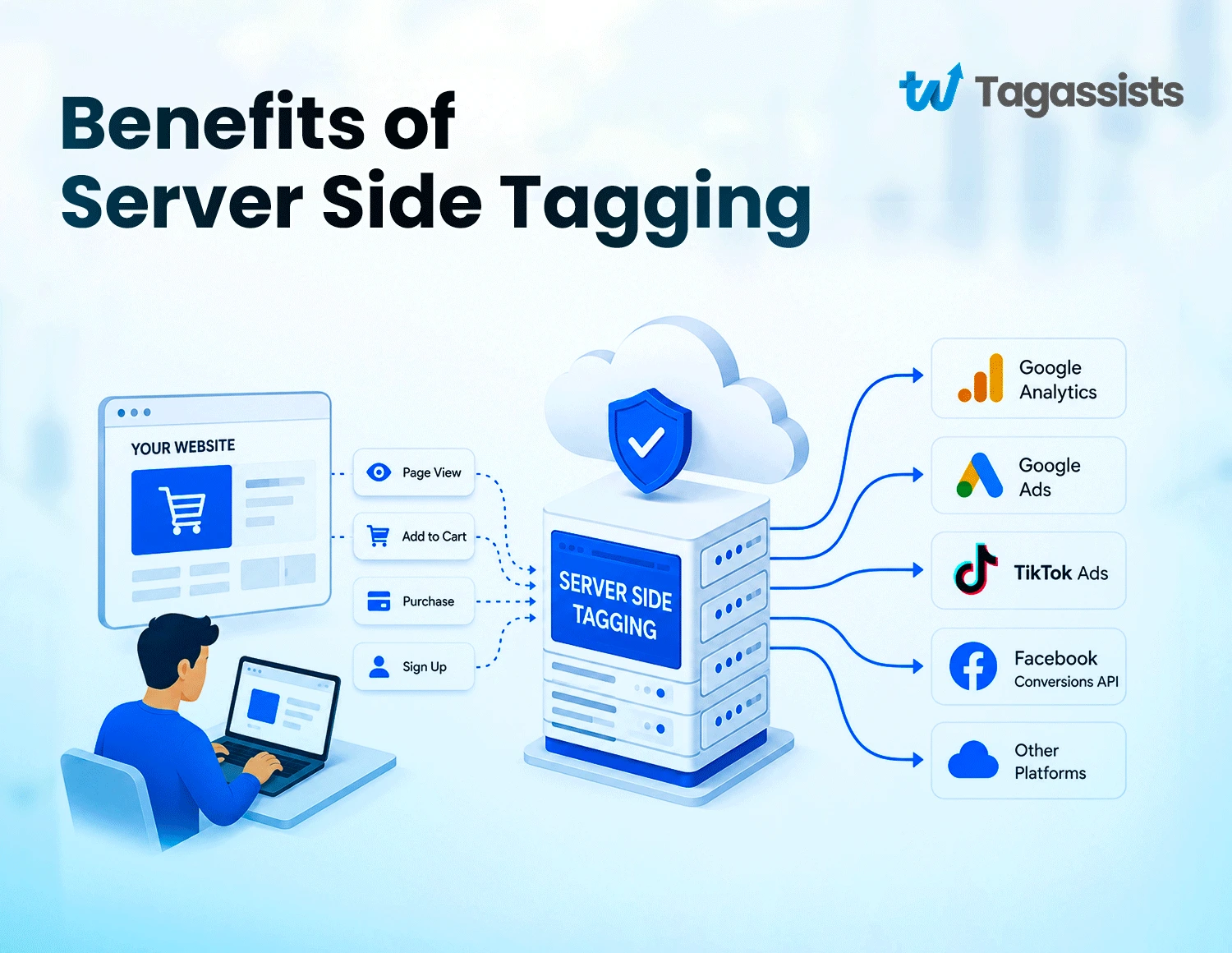
Server-side tagging moves tracking work off the visitor’s browser and onto your own cloud server. This ensures benefits such as pages load faster, more data gets through ad blockers and browser restrictions, and first-party cookies last longer.
If you’ve been running client-side tracking for a while, you already know the frustrations. Scripts slow your pages down. Ad blockers cut off data you have every right to collect. Server-side tagging fixes all of these problems by changing where tracking happens. Instead of loading a pile of JavaScript libraries in the visitor’s browser, you send event data to your own server first.
At Tagassists, we implement server-side tracking setup for ecommerce brands, SaaS companies, and performance marketing teams. The improvement in data quality and campaign accuracy we see after migration is consistent.
Today we will show you 8 core benefits of server-side tagging.
Key Takeaways
- More tracking requests get through. Less data lost to browser restrictions and blockers.
- Requests sent via your own subdomain bypass most common ad blockers.
- Server-set cookies persist longer than JavaScript cookies under Safari ITP rules.
- You decide exactly what data leaves your server and what gets filtered out before it reaches vendors.
- Acting as a data gatekeeper makes it simpler to meet privacy law requirements.
Better Website Performance
Every tracking script you load in the browser costs something. It takes bandwidth to download, CPU cycles to execute, and time before the page becomes interactive. With server-side tagging, most of that work moves off the visitor’s device entirely.
Better Website Speed
In a traditional client-side setup, each analytics or advertising platform you use loads its own JavaScript library on every page. Google Analytics, Meta Pixel, TikTok, LinkedIn, Google Ads remarketing tag: each one is a separate HTTP request, a separate script to download, and a separate piece of code running in the visitor’s browser simultaneously.
With server-side tagging, you replace all of those individual scripts with a single, lightweight client that sends event data to your server. Your server does the heavy lifting of routing that data to each platform. The visitor’s browser handles one request instead of eight. Pages load noticeably faster, especially on mobile connections.
Improved Site Performance and Reduced Page Load
The performance improvement is most visible on pages that carry a lot of tracking scripts. For a typical ecommerce store with GA4, Google Ads, Meta, TikTok, and a CRM pixel all firing client-side, server-side tagging can reduce the number of external script requests from ten to fifteen down to one or two.
Better User Experience
When your analytics setup stops competing with your content for the visitor’s bandwidth and CPU, the site feels more responsive. Visitors scroll more, engage more, and bounce less.
Higher Data Accuracy and Data Quality
Browser privacy features, ad blockers, network interruptions, and cookie restrictions all create holes in your client-side tracking. Server-side tagging closes most of them.
When tracking runs in the visitor’s browser, it’s subject to everything that browser does or doesn’t allow. Privacy extensions block outbound requests to known analytics domains. Safari’s Intelligent Tracking Prevention (ITP) limits what JavaScript can do with cookies. Firefox Enhanced Tracking Protection blocks a list of known trackers by default. Brave blocks most tracking scripts entirely.
Server-side tagging sidesteps most of these restrictions because the tracking request goes to your own domain, not to a third-party analytics domain.
Businesses looking for greater control over analytics data can also implement server-side collection with Matomo, which offers powerful first-party analytics alongside server-side tracking. See our complete Matomo Server-Side Tracking Guide to learn how it compares with traditional GA4 setups.
Improved Tracking Accuracy
The practical accuracy improvement varies by audience, but the direction is consistent. Industries with tech-savvy audiences (software, developer tools, B2B SaaS) tend to have ad blocker rates of 25 to 40%. Even a mainstream ecommerce audience will typically have 10 to 20 percent of visitors running some form of tracker blocking. Server-side tagging recovers a significant portion of that missing data.
More Reliable Data Collection
A browser extension blocks a request. A slow connection times out before the analytics script fires. A visitor closes the tab mid-session before the event fires. Server-side tracking processes data that has already left the page, making it more resilient to these browser-level interruptions.
More Reliable Data Stream
Marketing and analytics teams make budget decisions based on what their data shows. If your data is missing 15 to 25% of sessions due to ad blockers and browser restrictions, and your ROAS calculations are built on incomplete foundations. Server-side tagging stabilises the data stream you use to make those decisions.
Enhanced Data Quality Through Bypassing Browser Restrictions
Modern browsers are steadily tightening their restrictions on third-party tracking. Safari ITP regularly receives updates that reduce cookie lifespans or block new tracking techniques. Each update that restricts client-side tracking has no effect on server-side tracking because the data pathway doesn’t go through the browser at all. This makes server-side tagging a more future-proof tracking architecture.
Reduced Impact of Ad Blockers
Ad blockers are more widespread than most marketing teams account for. Estimates put global ad blocker usage at 25 to 40% among desktop users, with higher rates in tech-forward audiences. Every one of those users is a gap in your analytics data if you’re running client-side-only tracking.
Server-side tagging changes the endpoint. Instead of firing directly to google-analytics.com, your tracking sends data to analytics.yourdomain.com, a subdomain you control. That subdomain isn’t on any blocklist. The request goes through. Your server receives it, processes it, and forwards it to GA4, Google Ads, Meta, and wherever else it needs to go.
Extended First-Party Cookie Lifespan
One of the most practical and immediate benefits of server-side tagging is what it does to your first-party cookie lifespan in Safari.
Apple’s Safari browser implements Intelligent Tracking Prevention (ITP), a set of privacy features that limit how long cookies set by JavaScript can persist. When your tracking code runs in the browser and sets a cookie via JavaScript, Safari caps that cookie’s lifespan at seven days.
A server-set cookie on your own domain can persist for the full duration you configure it for, typically one year. Users who take longer to convert still get attributed correctly. Your remarketing audiences stay populated with returning users. Your attribution models reflect what actually happened.
Cookie Type | Lifespan in Safari (ITP) | Impact on Attribution |
JavaScript-set (client-side) | 7 days (sometimes 24 hours) | Users who return after 7 days appear as new visitors. Attribution gaps widen over time. |
Server-set (server-side) | Up to 1 year (configurable) | Full lifespan maintained. Long consideration cycles attributed correctly. |
Stronger Privacy and Data Control
Client-side tracking gives vendor code direct access to everything in the visitor’s browser: the URL, referrer, IP address, user agent, screen dimensions, and anything in your JavaScript environment. You don’t control what gets collected. You’re trusting the vendor’s documentation.
Server-side tagging changes that. Vendor code never runs in the browser. Every tracking request passes through your server first. You decide what leaves, what gets filtered, and what gets blocked before anything reaches a third party.
More Control Over Data Sent to Vendors
Google Analytics, Meta, Google Ads, they all receive exactly what you choose to send them. Nothing more. You can route different data to different vendors, strip fields you don’t need to share, and normalise inconsistent values before they reach any platform.
Data Filtering Before Sharing
Your server container sits between your website data and the outside world. Before anything goes out, it passes through your rules:
- Remove IP addresses before forwarding to analytics platforms.
- Hash email addresses for Enhanced Conversions instead of sending plain text.
- Strip internal fields from your data layer that vendors don’t need to see.
- Normalise data formats before they reach your reporting platform.
Protection of Personally Identifiable Information (PII)
PII leakage is more common than most businesses realise. Email addresses in URL parameters, order IDs in page titles, account numbers in the data layer: client-side libraries can pick all of this up and send it to third parties without you knowing. With server-side tagging, you inspect every field before it leaves your environment. Sensitive data gets stripped or hashed at the server level before it goes anywhere.
Acts as a Privacy Gatekeeper
Think of your server container as a customs check for your data. Every request passes through it before reaching any vendor. You control what gets through, what gets modified, and what gets blocked entirely. This isn’t just a configuration setting. It’s a structural change to how your tracking works.
Easier GDPR and CCPA Compliance
GDPR requires you to demonstrate what personal data you collect, where it goes, and why. That’s hard to prove when third-party vendor scripts run directly in browsers and may collect data beyond your configuration. You can’t fully control what a client-side library does.
With server-side tagging, every outbound request passes through your controlled server. You have a technical record of exactly what was transmitted to each vendor. You can strip IP addresses automatically, enforce consent signals before any data is forwarded, and implement opt-out logic at the server level so it can’t be bypassed by client-side script failures.
Server-side tagging doesn’t replace your Consent Management Platform. But it gives your compliance commitments real technical backing instead of relying on vendor self-reporting.
Enhanced Data Security
Every third-party script that loads in a visitor’s browser is a potential attack surface. Supply chain attacks on analytics and advertising libraries have been used to harvest payment data from checkout pages.
With server-side tagging, vendor code doesn’t execute in the browser at all. Google Analytics’ logic, Meta’s logic, every platform’s code runs on your server in a controlled environment. A compromised vendor script can’t reach your visitors’ payment fields or form data because it’s not running on their device.
- Sensitive identifiers are hashed or removed before data leaves your server. No plain-text email addresses travel to third parties.
- Your tracking endpoint is under your control. You apply security headers, rate limiting, and access controls that don’t exist on vendor endpoints.
- Server-to-server transmission isn’t visible in browser developer tools, so competitors can’t inspect your tracking setup.
- Every transmission is logged and auditable, giving you a security record that client-side tracking can’t provide.
Better Advertising Campaign Performance
Every benefit above feeds into this one. Faster pages, more complete data, longer cookies, cleaner attribution: it all converges on better campaign performance because your advertising algorithms are working with more accurate signals.
Smart Bidding learns from conversion history. Every event blocked by an ad blocker, dropped by a browser restriction, or lost to a short cookie is a missing training signal. Server-side tagging recovers those signals. More complete data means better-calibrated ROAS targets, more efficient bids, and more revenue from the same spend. The improvement compounds month over month as the algorithm builds on better data.
If you’re advertising on Meta, combining server-side tagging with the Meta Conversions API provides even more reliable conversion signals. Learn how to implement it in our Meta Server-Side Tracking Guide.
Conclusion
Server-side tagging is a structural improvement to how you collect, control, and use data across your entire marketing stack. The benefits are faster pages drive more completions, more complete data gives your analytics a truer picture, and cleaner data control reduces compliance risk. Better conversion signals improve campaign performance.
Browser privacy restrictions tighten every year. The data quality gap between client-side and server-side tracking grows wider with every update. If you’re making meaningful decisions based on your analytics data and spending real budget on paid advertising, the accuracy of that data is worth protecting. Server-side tagging is the most effective way to do that right now.
Frequently asked questions
What is the main benefit of server-side tagging?
Tracking data passes through your own server before reaching any third-party vendor. This gives you control over what is shared, bypasses most ad blockers, extends first-party cookie lifespans, reduces browser script load, and improves the completeness of your analytics and conversion data.
Does server-side tagging really improve website speed?
Yes. Multiple third-party scripts are replaced with a single lightweight client. The heavy routing and processing happens on your server, not in the browser. Fewer HTTP requests and less JavaScript execution means faster Time to Interactive and better Core Web Vitals, especially on mobile.
Is server-side tagging right for every business?
Not for everyone. Very small businesses with low ad spend may find the setup cost isn’t justified. It delivers the clearest ROI for businesses spending $5,000 or more per month on ads, running multiple ad platforms, operating in privacy-sensitive industries, or serving audiences with high ad blocker usage.
Does server-side tagging work alongside my existing client-side tracking?
Yes. Server-side tagging is designed to complement, not necessarily replace, client-side tracking. Many businesses start with a hybrid setup where the browser sends data to a server-side container, which then distributes it to platforms like GA4, Google Ads, and Meta. This approach lets you migrate gradually without disrupting your existing analytics while gaining better control over your data.
Is server-side tagging difficult or expensive to set up?
The setup is more complex than traditional client-side tracking because it requires configuring a server container, cloud hosting, and updating your tracking architecture. There are also ongoing hosting costs. However, for businesses that rely heavily on digital advertising or accurate attribution, the improvements in data quality, privacy compliance, and campaign performance often outweigh the additional implementation and maintenance costs.

Abdullah Al Zahid
Abdullah Al Zahid is the CEO & Founder of tagassists and a media buying specialist with over 4 years of experience. He has managed more than $7.5M in advertising spend, helping businesses grow through effective digital marketing, web analytics, and tracking solutions.