Server-Side Tracking & Setup Service
Your ad platforms are reporting fewer conversions than you actually made. Server-side tracking recovers 30–50% of lost conversions. We set up server-side Google Tag Manager so GA4, Google Ads, and Meta stop losing conversions to ad blockers and browser restrictions.
"*" indicates required fields
What Is Server-Side
Tracking(sGTM)?
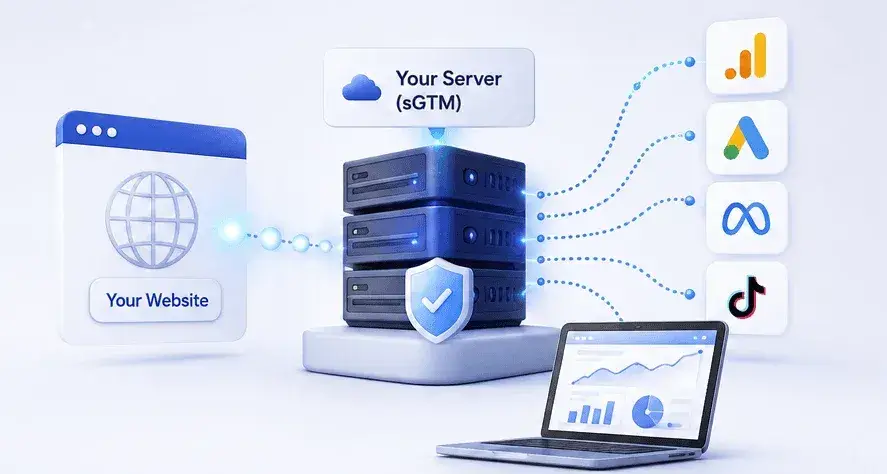
Server-side tracking sends your website data to a server you control before it reaches GA4, Google Ads, or Meta. Instead of the browser sending data directly to each platform, one request goes to your own domain first. Your server then decides what gets sent, where, and with which data attached.
The browser captures user actions. Client-side GTM collects the data. Server-side GTM processes it. The data then reaches your analytics and advertising platforms as part of your tracking setup with no data loss, better tracking accuracy, more data control, and stronger ad attribution.
Browser → Client-side GTM → Server-side GTM → GA4 / Google Ads / Meta CAPI / TikTok
Why Ad Blockers and Browser
Privacy Rules Break Client-Side Tracking?
Browsers and blockers treat tracking requests as something to stop. Ad blockers recognise the addresses your tags call and cut the connection. Safari deletes the cookies that hold your click IDs. The result is that some conversions are never reported at all, and others arrive with no idea which ad caused them.

Ad blockers can stop tracking requests before data is sent.

Browser tracking cannot access important backend data.

Short cookie lifetimes can reduce attribution accuracy.

Too many tracking tags can slow down your website.

Safari can limit cookie lifetime and make returning users harder to recognize.

Some checkouts like Shop Pay, Apple Pay, and PayPal can bypass browser tracking.

JavaScript errors or app conflicts can prevent tracking tags from firing.

Lost cookies can break the connection between ad clicks and conversions.
What's Included in Our
Server-Side Tracking Service
Whether you need a complete server-side setup or help fixing specific tracking gaps, we handle everything from sGTM and first-party cookies to GA4, Meta CAPI, Google Ads, consent, and e-commerce tracking. Get vmore accurate data, stronger attribution, and fewer missed conversions.

Server-Side GTM (sGTM) Audit
We start by measuring what you’re actually losing. We compare your platform-reported conversions against your real orders or CRM records, check whether events fire on every conversion path, and test your current deduplication. You get a variance figure. If the audit shows server-side won’t help much, we tell you that before you spend anything.

Server-Side GTM (sGTM) Setup
We provision your tagging server, build the container, and configure the environment properly from the start. Hosting can run on Stape, Cloud Run, Addingwell, or TAGGRS; we recommend based on your traffic and where your data needs to sit, not on who pays commission. Includes request-volume sizing so you don’t hit a quota wall during a peak sales period.

Custom Tracking Domain Setup
We provision your tagging server, build the container, and configure the environment properly from the start. Hosting can run on Stape, Cloud Run, Addingwell, or TAGGRS; we recommend based on your traffic and where your data needs to sit, not on who pays commission. Includes request-volume sizing so you don’t hit a quota wall during a peak sales period.

First-Party Cookie Configuration
Cookies written by JavaScript get deleted by Safari after seven days. We set yours from the server using HTTP headers instead, which lets them follow their intended lifetime. That keeps your GA4 client ID stable and your Meta identifiers intact across visits, so returning customers stay recognisable instead of appearing as brand-new anonymous traffic every week.

GA4 Server- Side Tracking
Done carelessly, moving GA4 to the server destroys attribution; purchases arrive with no session, no source, and geography marked “not set.” We preserve the browser’s client ID and session ID through to the conversion, keep session start events intact, and verify in DebugView. Your reports show the full journey, not a stranger appearing at checkout.

Meta Conversions API (CAPI)
We run CAPI alongside your Pixel, not instead of it, because Meta combines the identifiers from both. We send the full permitted parameter set, hashed email, phone, name, location, plus browser identifiers, and monitor your Event Match Quality score. Most accounts sit at 4–6 out of 10. Properly configured, purchase events should reach 7 or higher.

Google Ads Server-Side
We route your Google Ads conversions through the server container with enhanced conversions configured and consent signals passing correctly. Click identifiers are captured and preserved, including the iOS variants most setups miss. If you’re in the EEA or UK, this only works when Consent Mode v2 is correct, so we check that first rather than debugging it afterwards.

Data Layer Verification & Enhancement
A tagging server can only forward events that actually fire. We check every conversion path, fix events that break silently, and standardise naming so your data stays consistent. Then we add what the browser never had, profit margin instead of revenue, subscription versus one-time, returning versus new, so ad algorithms optimise toward your best customers, not just your biggest orders.

Event Deduplication Setup
When Pixel and server both report the same purchase without a shared identifier, Meta counts it twice. Your ROAS looks better than it is, and you scale spend on a false signal. We generate one event ID per conversion, pass it through both paths, and confirm Events Manager shows a single event from two sources. Broken deduplication also drags down match quality.

Click ID Preservation (GCLID, FBCLID, etc.)
Click identifiers are what connect a sale back to the ad that caused it. They live in cookies, and cookies get deleted. We capture them on landing, store them server-side, and format them correctly for each platform, including the iOS-specific Google variants. For webhook-driven conversions, we snapshot the browser identifiers while the visitor is still on the site.

Consent Mode v2 Implementation
Mandatory since March 2024 for EEA and UK traffic. Without it, Google Ads conversions stop reporting and your remarketing audiences go empty. We configure all four consent signals correctly, a very common failure is a setup that only passes two of them, which is v1 behaviour and silently incomplete. We advise on Basic versus Advanced and what each means for your data.

Cookie Consent Platform Integration
Your consent banner and Consent Mode are two different things, and you need both working together. We wire your CMP, so it genuinely gates tags rather than just appearing to, passes all four signals in a single update, and communicates consent state through to the server container. Works with Cookiebot, OneTrust, CookieYes, Iubenda, and other certified platforms.

E-commerce Server-Side Tracking
Built for Shopify, WooCommerce, and other store platforms. We cover the full funnel: product views, add to cart, checkout steps, purchase, and refunds with correct product and order data attached. Shopify’s Checkout Extensibility changed how checkout tracking works and broke a lot of older setups. If yours predates that migration, we rebuild it properly.

Lead Generation Server-Side Tracking
Form fills aren’t conversions. We connect click identifiers to your CRM so Google and Meta learn which campaigns produce qualified leads and closed deals. Includes Offline Conversion Tracking and CRM & Backend Conversion Tracking, along with enhanced conversions for leads, with GCLID stored against each record. Works with HubSpot, Salesforce, Pipedrive, and most CRMs with an API.
What Improves in Your GA4, Google
Ads & Meta Reporting?
Better data changes what your ad platforms do, not just what your reports say.
Meta matches more real customers. Events carry hashed email, phone, name, and location data the server has, and the browser often doesn’t. Event Match Quality is the visible measure: email alone lands around 5 or 6, the full set pushes past 7.

Ads and Meta stop losing conversions
Better data changes what your ad platforms do, not just what your reports say. Meta matches more real customers. Events carry hashed email, phone, name, and location data the server has, and the browser often doesn’t. Event Match Quality is the visible measure: email alone lands around 5 or 6, the full set pushes past 7.

GA4 shows what actually happened
Paid clicks stop appearing as direct traffic. Purchases connect to the sessions that produced them instead of surfacing alone. The “(not set)” and “Unassigned” rows shrink, and your channel reporting starts reconciling.

Smart Bidding and auto-bidding get better data
This one shows up in spend, not reports. Automated bidding only learns from conversions it can see. Give it complete events with real values attached and the same budget starts finding better customers.

Duplicate conversions disappear
If your Pixel and CAPI have been double-counting, your reported ROAS has been inflated. Fixing it can make the numbers look worse before they look right.

You can send values the browser never knew
Profit margin instead of order value. Lead score instead of form fill. Refund-adjusted revenue instead of gross. This is the single biggest lever most advertisers never pull.

Your site gets lighter
Moving tag logic off the browser reduces script weight, which helps page speed and Core Web Vitals.Moving tag logic off the browser reduces script weight, which helps page speed and Core Web Vitals.

Numbers stop contradicting each other
GA4, Google Ads, Meta, and your backend will never match exactly; different attribution models, different windows. But the gap is explainable after a proper setup.

Tracking survives platform changes
When an API updates or a pixel changes, we fix the server container. Your site stays untouched.

Consent is applied once, consistently

Rather than depending on every individual tag to honour it correctly.
Our
Server-Side
Tracking Setup
Process
Nothing goes live until it’s tested. We audit, build, migrate, validate, and deliver with proof at each stage rather than a claim at the end.

1. Access & Tracking Audit
First, we look at what you already have, and we send a checklist so nothing gets missed. Then we go through your existing setup properly. This is where we find the things nobody knew were broken.

2. Server GTM Setup
Next, we build the infrastructure. That means creating your server container, pointing a subdomain like track.yourdomain.com at it, and getting the certificate and DNS right. If you have a preference on hosting, we'll work with it. If not, we'll recommend one.

3. Server-Side Tracking Implementation
Now the actual migration. We move GA4, Google Ads, Meta CAPI, TikTok, and anything else you're running over to the server container, one at a time rather than all at once. If you're advertising into Europe or the UK, consent handling is built in here, not bolted on later.

4. QA & Validation
Now the actual migration. We move GA4, Google Ads, Meta CAPI, TikTok, and anything else you're running over to the server container, one at a time rather than all at once. If you're advertising into Europe or the UK, consent handling is built in here, not bolted on later.

5. Final Testing & Delivery
Last, we run the whole thing end-to-end on live traffic and watch it for a few days. We compare what the platforms report against your actual orders and confirm the gap is where it should be. Then you get documentation: what's running, where, why it's configured that way, and what to check if something looks off later.

Why Choose Tagassists for Server-Side Tracking
Deduplication that looks correct and isn’t. Consent Mode passing two signals instead of four. Measurement Protocol events landing with no session attached. These failures are silent; the dashboard looks healthy while the data underneath is wrong. And we setup proper server side tracking to fix the issues for you.
- We measure before we sell.
- We don't promise numbers we can't control.
- Validation is part of the build, not an add-on.
- We're hosting-neutral.
- You get documentation and ownership.
- We work the whole stack, not one platform.
Case Studies
See how Tagassists sets up accurate tracking, server-side pipelines, and analytics that scale. Each case study shows the problem, the fix, and the results, from ecommerce to SaaS to lead-gen.
Customer Reviews
People running the same platforms you are, on what changed after the setup went live.
“Working with tagassists on multiple client tracking setups has been an excellent experience. Their expertise in conversion tracking, analytics implementation, and performance attribution helped ensure our campaigns ran with accurate data and reliable reporting. The team was professional, detail-oriented, and consistently delivered high-quality work on time.
We highly recommend tagassists to any business looking for a skilled tracking and analytics specialist.”
Will jago
Marketing Director
IELTS Accelerator
“Tagassists helped us set up accurate tracking across multiple IELTS course sales funnels. Their work improved our conversion tracking, reporting accuracy, and overall campaign optimization. Professional, reliable, and easy to work with.”
Mohammad Alaya
Director
FAQ: Server-Side Tracking Setup Service
Often not yet. The setup cost only makes sense once inaccurate data is meaningfully affecting spend decisions. If you’re running low ad budgets, your checkout is standard, and your traffic isn’t heavily Safari or ad-blocked, fix your existing tags first. Our audit tells you which situation you’re in before you commit.
Two separate costs. Hosting runs roughly $20–100 a month for most sites; Stape starts around $20 for 500K requests; Google Cloud Run is around $45 per server with a two-instance minimum. Implementation is the real spend: typical agency pricing sits between $2,000 and $5,000, because a proper build takes 20–40 hours, including debugging.
Not on your side. We handle the container, DNS, cookies, and platform connections. You’ll need someone who can add a DNS record and grant admin access to GTM, GA4, Google Ads, and Meta. If you’re on Shopify or WordPress, that’s usually it.
Tag Gateway serves Google’s scripts from your domain so they’re less likely to be blocked. It’s easier to set up but covers Google products only: GA4, Google Ads, Floodlight. Meta, TikTok, and LinkedIn are untouched. It also doesn’t fix cookie lifetime or let you enrich data. If Google is all you run, Gateway may be enough. If you run Meta, you need sGTM. They can also run together.
No, and any setup that tries to do that is broken. GA4 needs the browser for session and geography data. Meta performs better with Pixel and CAPI running together, because it combines identifiers from both. The correct architecture is hybrid: client-side for browser context, server-side for reliability and enrichment, with deduplication tying them together.
It’s overkill when your data problems are upstream. If events aren’t firing, naming is inconsistent, or your checkout doesn’t produce a purchase event at all, a tagging server has nothing to forward. Fix the data layer first. It’s also of limited value if your checkout runs through Shopify, Apple Pay, or an iframe your server can’t see.
GA4, Google Ads, Meta CAPI, TikTok Events API, LinkedIn, Snapchat, Pinterest, Microsoft Ads, Klaviyo, and most CRMs with an API. Anything with a documented server-side endpoint can be connected. Your setup only includes what you actually use; we don’t wire up platforms you’re not running.
Server-side tracking gives you more control over what data leaves your infrastructure, which supports compliance. It doesn’t create it. You still need a valid consent mechanism, a clear privacy policy, and a lawful basis for what you collect. We configure Consent Mode v2 and CMP integration correctly. Anyone claiming a setup is “GDPR compliant by default” is overselling.
Yes, genuinely, and if you’re comfortable in GTM with time to spend, you probably should. Hosting is the easy part. The cost is in the other 90%: event design, deduplication, cookie configuration, consent signals, click ID handling, and validating against real orders. Experienced practitioners budget 20–40 hours, most of it debugging.
Two to four weeks for most sites. A straightforward e-commerce build can be done in two. Multi-platform setups, complex CRM integrations, or sites with significant existing tracking debt run four to six. The audit stage takes a few days, and we’ll give you a timeline before starting rather than after.
It’ll shrink the gap and make it explainable, but the numbers will never match exactly. GA4 and Google Ads use different attribution models and different conversion windows, so some difference is correct. What server-side fixes is the portion caused by blocked requests, expired cookies, and lost click IDs, usually the largest and most fixable part.It’ll shrink the gap and make it explainable, but the numbers will never match exactly. GA4 and Google Ads use different attribution models and different conversion windows, so some difference is correct. What server-side fixes is the portion caused by blocked requests, expired cookies, and lost click IDs, usually the largest and most fixable part.
Depends on volume and where your data must sit. Under moderate traffic, managed hosting like Stape or TAGGRS is cheaper and faster than Cloud Run’s idle cost. Addingwell hosts in the EU if data residency matters. One thing worth knowing: Stape and TAGGRS stop serving when you exceed quota; Stape pauses the container and drops requests, while Addingwell bills overage instead. On a peak sales day, that’s the difference between a larger invoice and total data loss.